🗿Day 40: Kubernetes!

👋 Hi, I'm Ritesh Dolare, a DevOps enthusiast dedicated to mastering the art of DevOps.
Today marks a key milestone in our DevOps journey as we dive into Kubernetes—the powerful tool that manages and scales containerized applications. After covering cloud computing, Docker, and CI/CD pipelines, we’re now ready to explore how Kubernetes orchestrates applications at scale. We’ll break down its architecture, understand its core components, and get hands-on with managing our own Kubernetes clusters. Let’s unlock the full potential of Kubernetes and take our DevOps skills to the next level!💪🔥
The Kubernetes journey so far
In the early 2000s, Google was dealing with an enormous amount of data and applications. Managing these efficiently across thousands of servers was a huge challenge. To solve this, Google created an internal system called Borg around 2003-04. Borg was like a giant factory manager, making sure that all the servers (which we can think of as factory workers) were doing their jobs correctly and efficiently.
Later, Google refined Borg and created a new system called Omega. These systems were designed to handle Google’s massive workloads, running thousands of tasks across many servers, ensuring that everything worked smoothly.
However, these systems were only used inside Google. In 2014, Google decided to share a new version of these ideas with the world by creating Kubernetes and releasing it as an open-source project. Open-source means anyone can use, modify, and contribute to it for free. It’s like Google giving away the blueprint of their factory manager to the public.
What is Kubernetes?
Kubernetes is a tool that helps manage applications. But what does that mean? Imagine you’re running a fast-food chain. Kubernetes is like the manager who makes sure every branch is stocked, every worker knows their job, and the customers get their orders quickly, no matter how busy it gets.
Specifically, Kubernetes manages containers. Containers are a bit like take-out boxes. They package everything an app needs to run (like code, libraries, and settings) into one neat bundle. This makes it easy to move the app around from one place to another, just like you can take your take-out box from the restaurant to your home.
Kubernetes takes care of all these containers, ensuring they run smoothly, are in the right place, and get what they need (like network connections or storage).
Why Kubernetes is so hot?
Kubernetes is popular because it solves a big problem: making sure that apps can run smoothly on different computers, servers, or even in the cloud. Before Kubernetes, managing these containers and making sure they were always running correctly could be a headache. Kubernetes automates much of this process, saving time and reducing errors.
Kubernetes Architecture
Kubernetes follows a client-server architecture. This means it has a central control system (the Master Node) and several worker units (the Worker Nodes) that carry out the tasks. Here’s a breakdown:
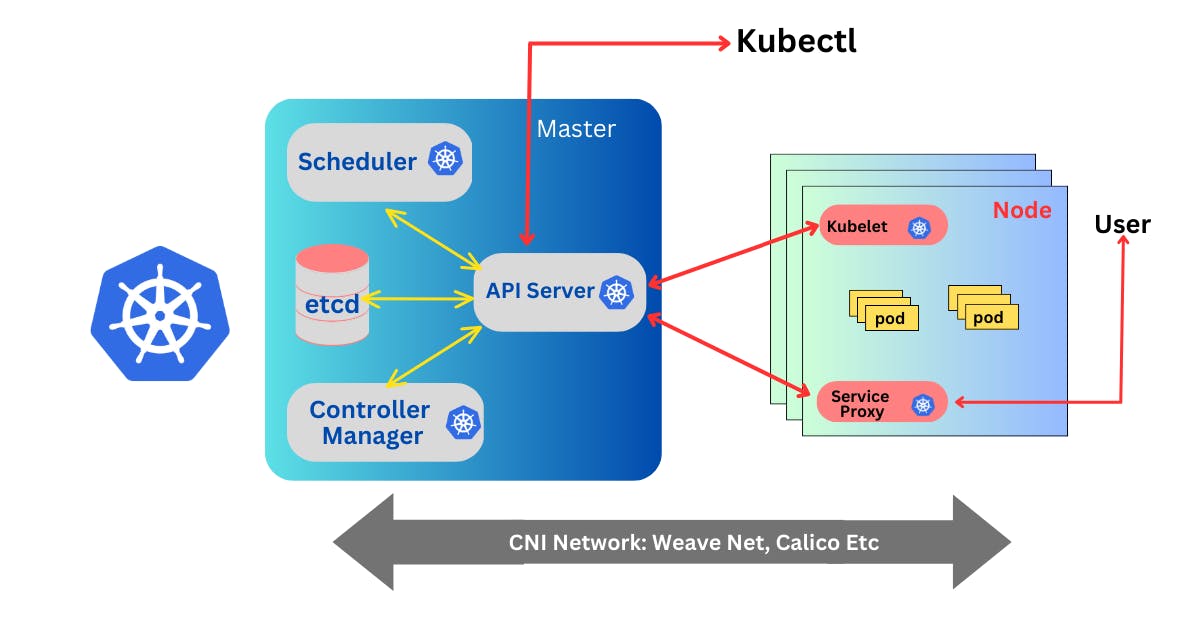
1. Master Node (Control Plane)
The Master Node is like the brain of Kubernetes. It controls everything that happens in the cluster (a group of servers or computers working together). The Master Node has several key components:
Kube-API Server: This is the entry point for all commands and requests. It’s like the front desk of the Kubernetes office. When you give Kubernetes a task (like starting a new app), it goes through the Kube-API Server.
etcd (Key-Value Store): This is a database that stores all the information about the cluster, like what apps are running and where. It’s called a “Key-Value Store” because it stores data in simple pairs: a key and its value.
Controller Manager: This component makes sure everything is running as it should. It constantly checks the current state of the system against the desired state (what you want the system to look like) and takes action if there’s a difference.
Scheduler: The Scheduler is responsible for assigning tasks to the worker nodes. It looks at the available resources (like CPU and memory) and decides where to run each app.
2. Worker Node
The Worker Nodes are like the workers in a factory. They do the actual work, like running the apps and processing data. Each Worker Node has several key components:
Kubelet: This is the main agent on each Worker Node. It listens to the Master Node and makes sure that the containers (the apps) are running as they should. It also reports back to the Master Node if there are any problems.
Container Runtime: This is the software that runs the containers. The most common one is Docker. It’s responsible for pulling the right app version, starting it, and stopping it when needed.
Kube-proxy: This component manages the network communication within the cluster. It makes sure that the apps can talk to each other and handles load balancing, ensuring that no single app instance gets overwhelmed with too much traffic.
Pod: A Pod is the smallest unit in Kubernetes. It’s like a box that contains one or more containers. If you need to scale your app, Kubernetes adds more pods. Each pod is assigned to a Worker Node, and it’s Kubernetes’ job to make sure they’re always running smoothly.
What Can Be Achieved by Using Kubernetes?
With Kubernetes, companies can achieve several important things:
Auto-Scalable Infrastructure: Kubernetes can automatically adjust the resources it uses based on demand. This means companies don’t have to manually add or remove servers – Kubernetes does it for them.
Application-Centric Management: Instead of focusing on managing hardware (like servers), Kubernetes focuses on the apps themselves. This makes it easier to deploy and manage software.
Highly Available Systems: Kubernetes is designed to keep apps running all the time, even if parts of the system fail. It can automatically recover from many types of failures.
Portability and Near-Zero Downtime: Kubernetes makes it easy to move apps between different environments (like from testing to production) without downtime. It can also roll back to previous versions if something goes wrong with an update.
Environment Consistency: Whether it’s for development, testing, or production, Kubernetes ensures that the environment is the same, reducing bugs and issues that can occur due to differences in environments.
Decentralized, Self-Healing Infrastructure: Kubernetes is built to handle tasks in a distributed manner, which means it doesn’t rely on a single point of failure. If something breaks, Kubernetes automatically tries to fix it.
Load Balancing: Kubernetes can evenly distribute network traffic to ensure that no single part of the system becomes overloaded.
Conclusion
Kubernetes is a powerful tool that has transformed how companies manage their applications. By automating many of the complex tasks involved in deploying and managing software, it allows businesses to focus more on building great products and less on managing infrastructure.
In the tech world, Kubernetes has become essential, and its flexibility, reliability, and scalability make it the go-to solution for companies of all sizes. As you continue learning about Kubernetes, you’ll discover even more about how it works and how it can be used to build and manage applications effectively.
stay tuned for more detailed explorations of Kubernetes in future posts!
Happy learning😊


